前言
关于 Android View 绘制流程是个老生常谈的主题了,相关的优秀博客也有很多,本篇博客希望通过一张时序图作为主线,尽量以好记、好看、好讲的方式简要表述 View 绘制流程一些关键节点。
开发环境
Android Studio Arctic Fox|2020.3.1 Android 33View 绘制流程时序图
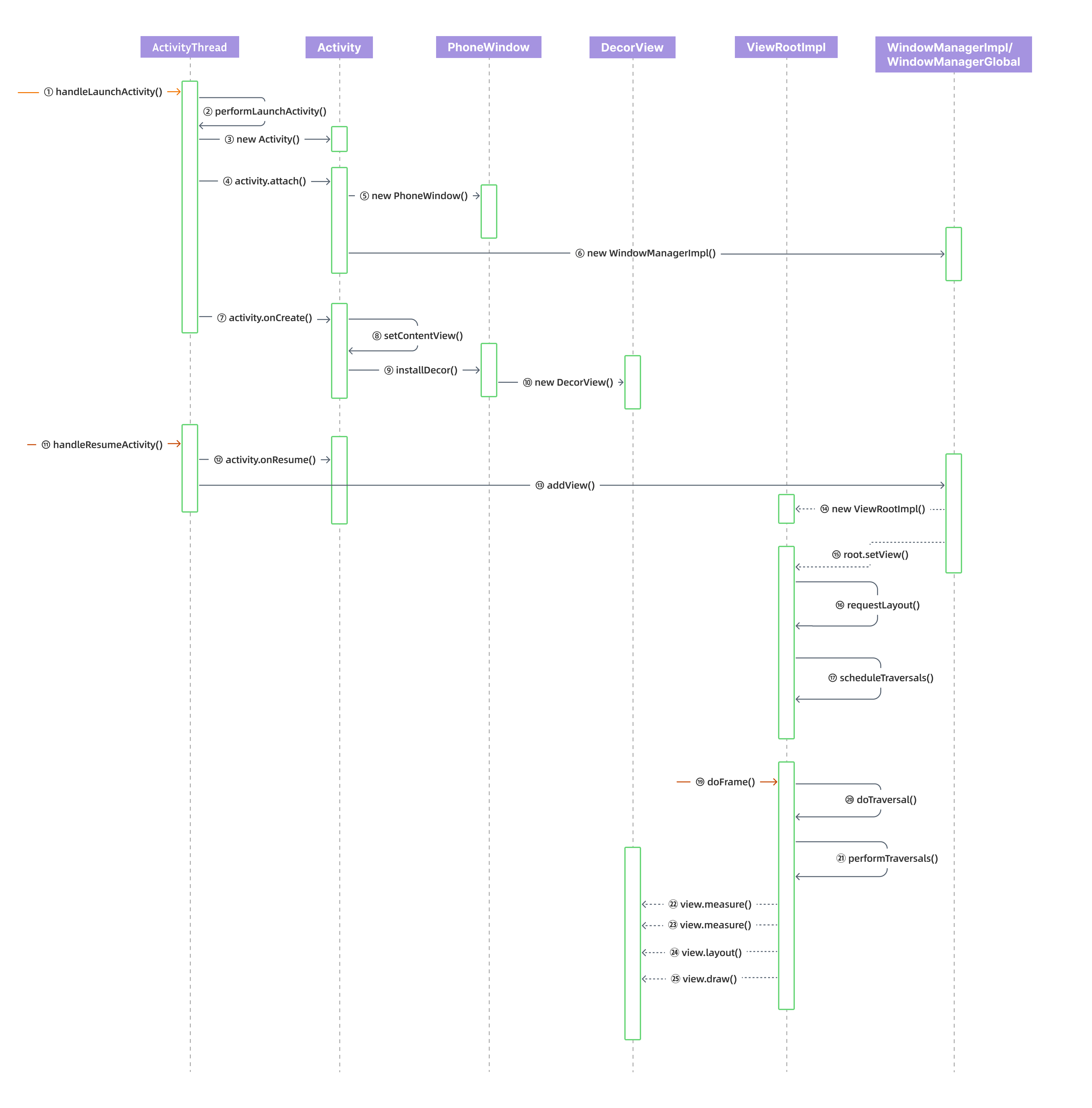
对象(Object)描述
| 对象 | 描述 |
|---|---|
| ActivityThread | 负责应用程序的生命周期管理和主线程消息循环。 |
| Activity | • 提供用户界面:每个 Activity 都包含一个布局文件(XML)或动态生成的视图(View),用于显示内容。• 处理用户交互:响应用户操作,如点击、滑动等。• 管理生命周期:Activity 有自己的生命周期,系统会在不同状态下回调相应方法(如创建、启动、暂停、销毁等)。• 组件通信:通过 Intent 与其他 Activity、Service 或应用组件通信。 |
| PhoneWindow | PhoneWindow 是 Window 类的具体实现,用于表示一个应用程序窗口。它是 Activity 和 Dialog 的窗口实现类,负责管理窗口的装饰(DecorView)和内容视图。 |
| DecorView | 它是整个应用窗口 View 树,触摸事件和其他输入都会首先到达这里,然后再分发下去。 |
| ViewRootImpl | 负责 View 的测量、布局、绘制、渲染,事件分发和与 WindowManagerService 的交互。 |
| WindowManagerImpl | WindowManagerImpl 是 WindowManager 接口的具体实现类,负责窗口的添加、更新和删除等操作。它直接与应用程序交互,处理窗口的布局、绘制和事件分发。每个 Activity 或 Dialog 通常都有一个对应的 WindowManagerImpl 实例,管理其窗口。 |
| WindowManagerGlobal | WindowManagerGlobal 是一个全局单例类,负责管理整个应用程序的所有窗口。它协调多个 WindowManagerImpl 实例,确保窗口操作的一致性和同步。作为系统级窗口管理的核心,与 WindowManagerService 交互,执行窗口的添加、更新和删除等操作。 |
消息(Message)说明
① handleLaunchActivity()
// ActivityThread.javapublic final class ActivityThread extends ClientTransactionHandler implements ActivityThreadInternal { ... // ApplicationThread 主要负责与 ActivityManagerService 进行 Binder 通信。 final ApplicationThread mAppThread = new ApplicationThread(); // 获取的是当前线程上的消息循环队列 final Looper mLooper = Looper.myLooper(); // H 继承自 Handler,负责消息处理 final H mH = new H(); ... private class ApplicationThread extends IApplicationThread.Stub { private static final String DB_INFO_FORMAT = " %8s %8s %14s %14s %s"; public final void scheduleReceiver(Intent intent, ActivityInfo info, CompatibilityInfo compatInfo, int resultCode, String data, Bundle extras, boolean sync, int sendingUser, int processState) { updateProcessState(processState, false); ReceiverData r = new ReceiverData(intent, resultCode, data, extras, sync, false, mAppThread.asBinder(), sendingUser); r.info = info; r.compatInfo = compatInfo; // 接收到的 AMS 消息,通过 mH 发送消息 sendMessage(H.RECEIVER, r); } }}Binder + Handler 消息机制,ApplicationThread 接收到跨进程的消息,通过 Handler (H) 将其切换到 ui 线程(ActivityThread),第一个消息是 LaunchActivityItem(LAUNCH_ACTIVITY),它调用 handleLaunchActivity(),在这个方法里完成了 Activity 的创建和启动等。
② performLaunchActivity()
// ActivityThread.javapublic final class ActivityThread extends ClientTransactionHandler implements ActivityThreadInternal { ... private Activity performLaunchActivity(ActivityClientRecord r, Intent customIntent) { ... ContextImpl appContext = createBaseContextForActivity(r); ... // 通过类加载创建 Activity activity = mInstrumentation.newActivity( cl, component.getClassName(), r.intent); ... Application app = r.packageInfo.makeApplicationInner(false, mInstrumentation); ... activity.attach(appContext, this, getInstrumentation(), r.token, r.ident, app, r.intent, r.activityInfo, title, r.parent, r.embeddedID, r.lastNonConfigurationInstances, config, r.referrer, r.voiceInteractor, window, r.activityConfigCallback, r.assistToken, r.shareableActivityToken); ... // 调用到 Activity 的 onCreate() if (r.isPersistable()) { mInstrumentation.callActivityOnCreate(activity, r.state, r.persistentState); } else { mInstrumentation.callActivityOnCreate(activity, r.state); } } }⑧ setContentView()
// AppCompatDelegateImpl.java class AppCompatDelegateImpl extends AppCompatDelegate implements MenuBuilder.Callback, LayoutInflater.Factory2 { ... @Override public void setContentView(int resId) { ensureSubDecor(); ViewGroup contentParent = mSubDecor.findViewById(android.R.id.content); contentParent.removeAllViews(); // 用户设置的布局添加到 ⑨ 创建的 DecorView android.R.id.content 节点下 LayoutInflater.from(mContext).inflate(resId, contentParent); mAppCompatWindowCallback.bypassOnContentChanged(mWindow.getCallback()); } ...}把用户设置的 setContentView(resId) 布局添加到 DecorView 布局下
⑨ installDecor()
// PhoneWindow.javapublic class PhoneWindow extends Window implements MenuBuilder.Callback { ... // 创建 DecorView private void installDecor() { mForceDecorInstall = false; if (mDecor == null) { mDecor = generateDecor(-1); mDecor.setDescendantFocusability(ViewGroup.FOCUS_AFTER_DESCENDANTS); mDecor.setIsRootNamespace(true); if (!mInvalidatePanelMenuPosted && mInvalidatePanelMenuFeatures != 0) { mDecor.postOnAnimation(mInvalidatePanelMenuRunnable); } } else { mDecor.setWindow(this); } if (mContentParent == null) { mContentParent = generateLayout(mDecor); } } ... // 基于 theme、features 设置布局,默认布局 R.layout.screen_simple protected ViewGroup generateLayout(DecorView decor) { // Apply data from current theme. ... } ...}⑪ handleResumeActivity()
Binder + Handler 消息机制,触发 ActivityThread 的 handleResumeActivity()
⑭ new ViewRootImpl(
// ViewRootImpl.javapublic final class ViewRootImpl implements ViewParent, View.AttachInfo.Callbacks, ThreadedRenderer.DrawCallbacks, AttachedSurfaceControl { ... public ViewRootImpl(@UiContext Context context, Display display, IWindowSession session, boolean useSfChoreographer) { ... // 创建 ViewRootImpl 所在的线程,默认 mThread 是主线程(ActivityThread) // 部分刷新 UI 操作需要 checkThread() 进行校验 mThread = Thread.currentThread(); ... // View.post 里面判断的 mAttachInfo mAttachInfo = new View.AttachInfo(mWindowSession, mWindow, display, this, mHandler, this, context); ... mChoreographer = useSfChoreographer ? Choreographer.getSfInstance() : Choreographer.getInstance(); ... } ... void checkThread() { if (mThread != Thread.currentThread()) { throw new CalledFromWrongThreadException( "Only the original thread that created a view hierarchy can touch its views."); } } }⑮ root.setView()
// ViewRootImpl.javapublic final class ViewRootImpl implements ViewParent, View.AttachInfo.Callbacks, ThreadedRenderer.DrawCallbacks, AttachedSurfaceControl { ... public void setView(View view, WindowManager.LayoutParams attrs, View panelParentView, int userId) { synchronized (this) { if (mView == null) { mView = view; ... // Schedule the first layout -before- adding to the window // manager, to make sure we do the relayout before receiving // any other events from the system. requestLayout(); InputChannel inputChannel = null; if ((mWindowAttributes.inputFeatures & WindowManager.LayoutParams.INPUT_FEATURE_NO_INPUT_CHANNEL) == 0) { inputChannel = new InputChannel(); } mForceDecorViewVisibility = (mWindowAttributes.privateFlags & PRIVATE_FLAG_FORCE_DECOR_VIEW_VISIBILITY) != 0; if (mView instanceof RootViewSurfaceTaker) { PendingInsetsController pendingInsetsController = ((RootViewSurfaceTaker) mView) .providePendingInsetsController(); if (pendingInsetsController != null) { pendingInsetsController.replayAndAttach(mInsetsController); } } try { ... // 添加到 window 显示 res = mWindowSession.addToDisplayAsUser(mWindow, mWindowAttributes, getHostVisibility(), mDisplay.getDisplayId(), userId, mInsetsController.getRequestedVisibilities(), inputChannel, mTempInsets, mTempControls); } ... setFrame(mTmpFrames.frame); ... } } } }⑰ scheduleTraversals()
// ViewRootImpl.javapublic final class ViewRootImpl implements ViewParent, View.AttachInfo.Callbacks, ThreadedRenderer.DrawCallbacks, AttachedSurfaceControl { ... public void requestLayout() { if (!mHandlingLayoutInLayoutRequest) { checkThread(); mLayoutRequested = true; scheduleTraversals(); } } ... void scheduleTraversals() { if (!mTraversalScheduled) { mTraversalScheduled = true; // 同步屏障消息 mTraversalBarrier = mHandler.getLooper().getQueue().postSyncBarrier(); // 发布要在下一帧上运行的回调,回调运行一次,然后自动删除 mChoreographer.postCallback( Choreographer.CALLBACK_TRAVERSAL, mTraversalRunnable, null); notifyRendererOfFramePending(); pokeDrawLockIfNeeded(); } } }㉑ performTraversals()
屏幕的下一个 Vsync 信号到来,⑰ 设置的下一帧回调触发,执行到 performTraversals()
// ViewRootImpl.javapublic final class ViewRootImpl implements ViewParent, View.AttachInfo.Callbacks, ThreadedRenderer.DrawCallbacks, AttachedSurfaceControl { ... private void performTraversals() { ... Rect frame = mWinFrame; if (mFirst) { ... // 分发给 View 设置 mAttachInfo,这里会调用 View 的 onAttachedToWindow 方法,把 View.post 的任务添加给 // mHandler host.dispatchAttachedToWindow(mAttachInfo, 0); mAttachInfo.mTreeObserver.dispatchOnWindowAttachedChange(true); dispatchApplyInsets(host); } ... boolean layoutRequested = mLayoutRequested && (!mStopped || mReportNextDraw); if (layoutRequested) { if (!mFirst) { if (lp.width == ViewGroup.LayoutParams.WRAP_CONTENT || lp.height == ViewGroup.LayoutParams.WRAP_CONTENT) { windowSizeMayChange = true; if (shouldUseDisplaySize(lp)) { // NOTE -- system code, won't try to do compat mode. Point size = new Point(); mDisplay.getRealSize(size); desiredWindowWidth = size.x; desiredWindowHeight = size.y; } else { final Rect bounds = getWindowBoundsInsetSystemBars(); desiredWindowWidth = bounds.width(); desiredWindowHeight = bounds.height(); } } } // 确定 window 的大小,measureHierarchy() -> performMeasure() // Ask host how big it wants to be windowSizeMayChange |= measureHierarchy(host, lp, mView.getContext().getResources(), desiredWindowWidth, desiredWindowHeight); } ... if (mFirst || windowShouldResize || viewVisibilityChanged || params != null || mForceNextWindowRelayout) { ... if (!mStopped || mReportNextDraw) { if (mWidth != host.getMeasuredWidth() || mHeight != host.getMeasuredHeight() || dispatchApplyInsets || updatedConfiguration) { int childWidthMeasureSpec = getRootMeasureSpec(mWidth, lp.width, lp.privateFlags); int childHeightMeasureSpec = getRootMeasureSpec(mHeight, lp.height, lp.privateFlags); if (DEBUG_LAYOUT) Log.v(mTag, "Ooops, something changed! mWidth=" + mWidth + " measuredWidth=" + host.getMeasuredWidth() + " mHeight=" + mHeight + " measuredHeight=" + host.getMeasuredHeight() + " dispatchApplyInsets=" + dispatchApplyInsets); // 调用 DecorVier 的 measure 方法 // Ask host how big it wants to be performMeasure(childWidthMeasureSpec, childHeightMeasureSpec); // Implementation of weights from WindowManager.LayoutParams // We just grow the dimensions as needed and re-measure if // needs be int width = host.getMeasuredWidth(); int height = host.getMeasuredHeight(); boolean measureAgain = false; if (lp.horizontalWeight > 0.0f) { width += (int) ((mWidth - width) * lp.horizontalWeight); childWidthMeasureSpec = MeasureSpec.makeMeasureSpec(width, MeasureSpec.EXACTLY); measureAgain = true; } if (lp.verticalWeight > 0.0f) { height += (int) ((mHeight - height) * lp.verticalWeight); childHeightMeasureSpec = MeasureSpec.makeMeasureSpec(height, MeasureSpec.EXACTLY); measureAgain = true; } if (measureAgain) { if (DEBUG_LAYOUT) Log.v(mTag, "And hey let's measure once more: width=" + width + " height=" + height); performMeasure(childWidthMeasureSpec, childHeightMeasureSpec); } layoutRequested = true; } } } ... final boolean didLayout = layoutRequested && (!mStopped || mReportNextDraw); boolean triggerGlobalLayoutListener = didLayout || mAttachInfo.mRecomputeGlobalAttributes; if (didLayout) { // 调用 DecorVier 的 layout 方法 performLayout(lp, mWidth, mHeight); ... } ... if (!isViewVisible) { if (mPendingTransitions != null && mPendingTransitions.size() > 0) { for (int i = 0; i < mPendingTransitions.size(); ++i) { mPendingTransitions.get(i).endChangingAnimations(); } mPendingTransitions.clear(); } if (mSyncBufferCallback != null) { mSyncBufferCallback.onBufferReady(null); } } else if (cancelAndRedraw) { // Try again scheduleTraversals(); } else { if (mPendingTransitions != null && mPendingTransitions.size() > 0) { for (int i = 0; i < mPendingTransitions.size(); ++i) { mPendingTransitions.get(i).startChangingAnimations(); } mPendingTransitions.clear(); } // 调用 DecorVier 的 draw 方法 if (!performDraw() && mSyncBufferCallback != null) { mSyncBufferCallback.onBufferReady(null); } } } ... private boolean measureHierarchy(final View host, final WindowManager.LayoutParams lp, final Resources res, final int desiredWindowWidth, final int desiredWindowHeight) { int childWidthMeasureSpec; int childHeightMeasureSpec; boolean windowSizeMayChange = false; if (DEBUG_ORIENTATION || DEBUG_LAYOUT) Log.v(mTag, "Measuring " + host + " in display " + desiredWindowWidth + "x" + desiredWindowHeight + "..."); boolean goodMeasure = false; if (lp.width == ViewGroup.LayoutParams.WRAP_CONTENT) { // On large screens, we don't want to allow dialogs to just // stretch to fill the entire width of the screen to display // one line of text. First try doing the layout at a smaller // size to see if it will fit. final DisplayMetrics packageMetrics = res.getDisplayMetrics(); res.getValue(com.android.internal.R.dimen.config_prefDialogWidth, mTmpValue, true); int baseSize = 0; if (mTmpValue.type == TypedValue.TYPE_DIMENSION) { baseSize = (int) mTmpValue.getDimension(packageMetrics); } if (DEBUG_DIALOG) Log.v(mTag, "Window " + mView + ": baseSize=" + baseSize + ", desiredWindowWidth=" + desiredWindowWidth); if (baseSize != 0 && desiredWindowWidth > baseSize) { childWidthMeasureSpec = getRootMeasureSpec(baseSize, lp.width, lp.privateFlags); childHeightMeasureSpec = getRootMeasureSpec(desiredWindowHeight, lp.height, lp.privateFlags); performMeasure(childWidthMeasureSpec, childHeightMeasureSpec); if (DEBUG_DIALOG) Log.v(mTag, "Window " + mView + ": measured (" + host.getMeasuredWidth() + "," + host.getMeasuredHeight() + ") from width spec: " + MeasureSpec.toString(childWidthMeasureSpec) + " and height spec: " + MeasureSpec.toString(childHeightMeasureSpec)); if ((host.getMeasuredWidthAndState() & View.MEASURED_STATE_TOO_SMALL) == 0) { goodMeasure = true; } else { // Didn't fit in that size... try expanding a bit. baseSize = (baseSize + desiredWindowWidth) / 2; if (DEBUG_DIALOG) Log.v(mTag, "Window " + mView + ": next baseSize=" + baseSize); childWidthMeasureSpec = getRootMeasureSpec(baseSize, lp.width, lp.privateFlags); performMeasure(childWidthMeasureSpec, childHeightMeasureSpec); if (DEBUG_DIALOG) Log.v(mTag, "Window " + mView + ": measured (" + host.getMeasuredWidth() + "," + host.getMeasuredHeight() + ")"); if ((host.getMeasuredWidthAndState() & View.MEASURED_STATE_TOO_SMALL) == 0) { if (DEBUG_DIALOG) Log.v(mTag, "Good!"); goodMeasure = true; } } } } if (!goodMeasure) { childWidthMeasureSpec = getRootMeasureSpec(desiredWindowWidth, lp.width, lp.privateFlags); childHeightMeasureSpec = getRootMeasureSpec(desiredWindowHeight, lp.height, lp.privateFlags); performMeasure(childWidthMeasureSpec, childHeightMeasureSpec); if (mWidth != host.getMeasuredWidth() || mHeight != host.getMeasuredHeight()) { windowSizeMayChange = true; } } if (DBG) { System.out.println("======================================"); System.out.println("performTraversals -- after measure"); host.debug(); } return windowSizeMayChange; } ... // view.post 任务传递给 mHandler 处理 final ViewRootHandler mHandler = new ViewRootHandler(); ...}常见问题
为什么我在 onCreate() 中调用 View.post() 方法可以得到 View 的宽高呢?
// View.java /** * <p>Causes the Runnable to be added to the message queue. * The runnable will be run on the user interface thread.</p> * * @param action The Runnable that will be executed. * * @return Returns true if the Runnable was successfully placed in to the * message queue. Returns false on failure, usually because the * looper processing the message queue is exiting. * * @see #postDelayed * @see #removeCallbacks */ public boolean post(Runnable action) { final AttachInfo attachInfo = mAttachInfo; if (attachInfo != null) { return attachInfo.mHandler.post(action); } // Postpone the runnable until we know on which thread it needs to run. // Assume that the runnable will be successfully placed after attach. getRunQueue().post(action); return true; }onCreate() 时 mAttachInfo 为 null,任务放到了消息队列中,不是立刻执行,等到 Activity::onResume(),dispatchAttachedToWindow() 方法中把 View 的 post 任务添加到 ViewRootImpl handler 中,在 DocerView 经过 measure、loayout、draw 后,任务才执行。
MeasureSpec 的理解
invaliate() 和 requestlayout() 方法的区别?
ViewRootImpl 持有 DecorView 管理 View 的绘制。所以简单来说,requestlayout 和 invaliate 最终都会向上回溯调用到 ViewRootImpl 的 postTranversals 方法来绘制 View。 不同的是 requestlayout 会绘制 View 的 measure,layout 和 draw 过程。invaliate 因为只添加了绘制 draw 的标志位,只会绘制 draw 过程。
Activity 首次启动 onMeasure() 执行两次?
㉑ performTraversals() 方法内执行两次 onMeasure()
- 首次测量
- 这个阶段的主要目的是为了确定 RootView 的尺寸,进而决定 Window 尺寸。
- 二次测量
- 在这个阶段,由于已经知道了 Window 的大小,系统会对整个视图树中的各个组件进行精确地重新测量。
子线程刷新 UI 的几种方式?
- 避开 ViewRootImpl::checkThread()检测
- 利⽤硬件加速机制一些场景可以绕开 requestLayout()
- 主线程刚刚更新某个 View 后子线程立刻更新
- 尝试子线程中创建 ViewRootImpl
- GlSurfaceView 也算是在子线程中刷新 UI
参考文档
!icon 后记:View 绘制流程的代码主要在 Java 层,调试起来非常方便。然而,如果在梳理过程中试图涵盖每段代码的细节,就像测量海岸线的长度一样,会陷入无止境的分形中。普通的开发者总是渴望洞悉所有细节,但优秀的开发者懂得何时忽略不必要的细节。